Modeling Introduction
The figure shown provides a good conceptual picture of watershed processes simulated within WAM. The model first simulates the upland source cells across the entire watershed (examples of source cells are shown as red boxes) using one of three field-scale sub models that produce daily time series of surface and ground water flows and constituent concentrations leaving every grid cell in the watershed. These source cell flows and loads are then routed downstream. Groundwater is routed to the nearest stream or possibly offsite if the ground watershed differs from the surface watershed. Surface water is routed to the nearest downstream hydrologic feature (riparian wetland, depression or stream). based on distance, topography, and land use conditions between the source cell and its next destination. Surface water entering depressions is converted to groundwater and routed to the nearest stream. Surface water entering riparian wetlands is maintained as surface water and routed to the nearest stream. Attenuation is applied to the constituents differently for each of type of overland and ground water flow. Water and constituents reaching the streams are then routed hydrodynamically through the stream network. Flows and constituent concentrations are influenced along the way based on stream types, slopes, cross-sectional profiles, and structures, such as dams, weirs, or gates.
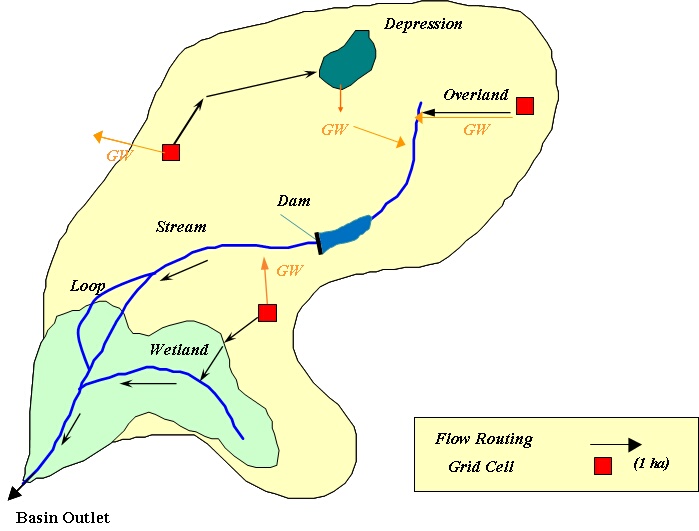
WAM is designed to take advantage of available GIS technology in that it represents, analyzes and displays a watershed's natural processes, features and interrelations between processes and features based on the spatial location and attribute information. WAM can be a tool to collect, classify and analyze the relationships inherent to watershed data, and report on any patterns that exist. It is primarily a process based model, but does use empirical algorithms where appropriate. These sub-routines are designed to run independently from each other, but consecutive to each other, as the inputs of one routine is dependent on the output of a previous routine. The GIS interface separates the user from requiring extensive knowledge of the sub-routine order and processes as well as the myriad of tables that store characterization data.
The interface is used to setup a watershed for analysis, develop scenarios, edit input parameters, and review the simulation results, which is covered in detail with the User Manual and Tutorial. This section of the documentation, briefly describes the process used in running the model and the order in which they are intended to be run. The science behind the subroutines and the processes is covered in more detail in the Technical Manual.