The WAM GIS Database and File Structure
The WAM folder structure is managed from within the ArcMap Catalog window. A scenario, housed within a project, contains all of the input, intermediate, and output data for a WAM simulation. WAM projects and scenarios are simply directories visible from within Windows Explorer as well as the Catalog window. In the figure below, a project has an icon of a map (scenario) inside a folder, while the scenario is symbolized as the map. Thus, a set of related scenarios are contained within a project. When a scenario is created via the ArcMap Catalog the folder structure is created. If the scenario was created by copying another scenario, the WAM Scenario database and WAM GIS geodatabase are copied into the new scenario folder. If it is a new undefined scenario, a default WAM Scenario database and empty WAM GIS geodatabase are copied into the new scenario folder.
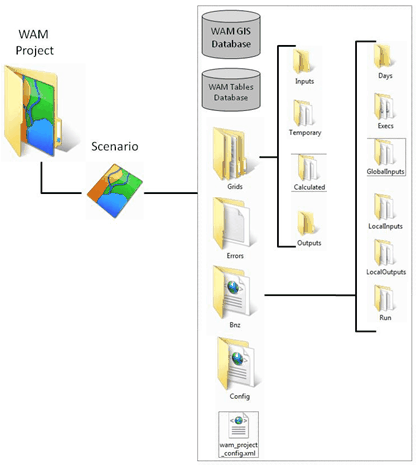
Within the scenario, there are two databases and a number of folders. The databases contain the model input parameters and feature classes that are edited using the WAM interface. One database (WAM_GIS_Geodatabase.mdb) contains all the GIS data while the second (Scenario_WAM.mdb) contains only tabular data used by WAM to parameterize the spatial features modeled in the scenario. The WAM GIS database is discussed in the next section of this user manual, Creating the WAM GIS database. The table database and its structure are outlined in the Data Flow Diagrams provided in the WAM Developer Manual.
If the scenario was created by copying another scenario, the WAM Scenario database and WAM GIS database are copied into the new scenario folder. If it is a new undefined scenario, a default WAM Scenario database is copied into the new scenario folder and an empty WAM GIS geodatabase must be created which will prompt the user for a spatial projection. Then the user will be prompted to import data sources to this geodatabase.
The remaining folders in the scenario are used by WAM when the model is executed. Before a scenario has been completely set up and executed successfully, some of the folders will be empty. Many of the components that underlie WAM are written in FORTRAN and use text based input files. These files are created from the WAM databases when a simulation is begun from the interface. Similarly, when a WAM simulation is complete the output files, such as output load maps, are in ASCII format. These are converted to an ESRI GRID format from an interface command in order to be displayed in ArcMap. Additionally, a number of intermediate datasets are created during various geoprocessing steps (such as computation of the Distance Grids). The WAM interface controls the conversion of the database files to model input files and will convert the output files into a format that can be viewed by the user. It is not typically necessary for a user to have a deep understanding of the folder structure in detail, but for advanced users the Developer Manual describes what is held in each folder and when it is used by WAM or the interface as applicable.