Irrigation Source
If the land use management parameters, as defined for each land use identifier (LUID), requires irrigation the source of that irrigation water must be established. WAM has the ability to simulate deep and shallow ground water withdrawals through wells, as well as if the source is from surface water, either streams, lakes, or reservoirs. If the source is not known, or not specified in this irrigation source feature class, the model assumes it to be from deep groundwater withdrawal. If the irrigation source is from surface waters, the model will remove water from the reach network to supply the irrigation demand and care must be taken when setting up the water control structures to ensure that an adequate supply is provided.
The irrigation controls, rate and timing, of each land use type is determined by the management parameters of Best Management Practices (BMP) set using the Global Properties Editor.
When you created the WAM GIS Data geodatabase, an empty polygon feature class "Irrigation Source" was created. This feature class contains no polygon features. Importing features into the empty feature class is discussed below. When WAM is run the vector dataset is converted into a integer raster grid, based on the irrigation source code.
Data Quality Assumptions
-
The spatial extent of each feature polygon is accurate and there are no gaps or overlaps between polygons.
-
The attribute parameterization of each feature polygon correctly defines the irrigation water source.
The fields used by the WAM irrigation source feature class are:
| Attribute | Alias | Data Type |
|---|---|---|
| IrrigationSourceID | IrrigationSourceID | Long Integer |
| IrrigFieldName | IrrigFieldName | String |
The IrrigFieldName (a string) is optional, null values are allowed. Typically, the name is used to name individual field names.
The SourceID values to parameterize the irrigation source feature class are:
| SourceID | Source Type |
|---|---|
| 1 | Deep Groundwater |
| 2 | Surface Water |
| 3 | Shallow Groundwater |
Typically, a single polygon is imported into this feature class and then the ArcMap editing tools are used to divide the polygon into different types after WAM setup.
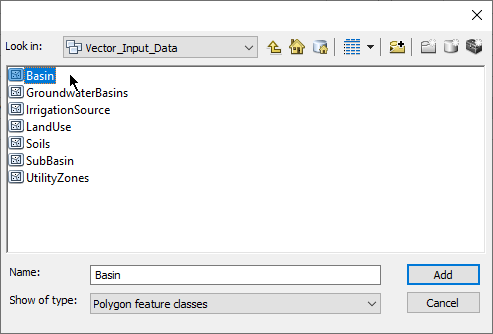
To import features into the irrigation source feature class, it is easiest to actually use the basin boundary that was created during the import of the sub-basin boundaries feature class. Thus, when browsing to the source feature class, simply use the "Basin" feature class in the WAM GIS Database for this scenario:
When the basin boundary has been selected, the SHAPE field is automatically mapped, but no other fields are needed. The feature class fields listed above are already in the feature class (with null values), but no other fields are added.
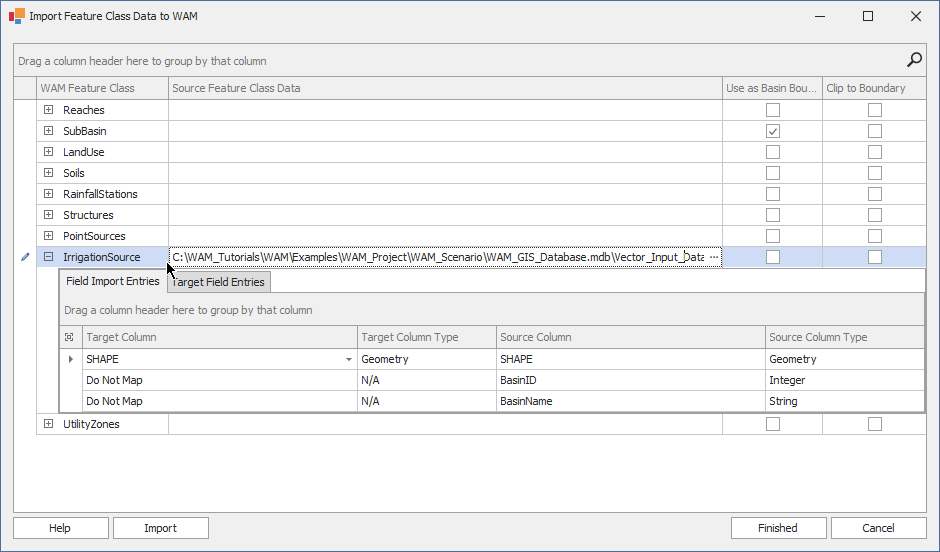
To add a default ID, use the ArcMap editor to add the appropriate value from the SourceID values listed in the table above. Unless you have specific information about the source of irrigation water, it is best to just set the value to zero (deep groundwater).