Soils
The soils feature class is used to characterize the soils types that exists within the watershed and is a major component of the models ability to routinely simulate the natural processes. WAM has been built to make use of the Natural Resource Conservations Services (NRCS) SSURGO Data.
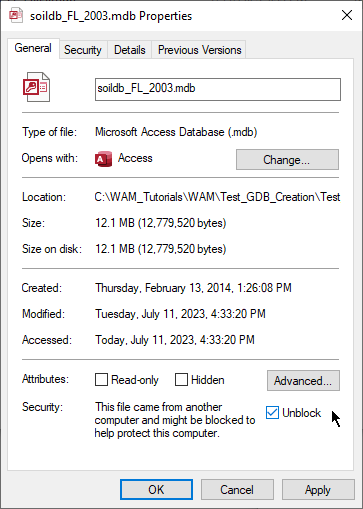
Soils data is obtained from NRCS Web Soil Survey on a county-by-county basis. From that page click on the download tab and select soil survey area and then the state and county you need. When this data is downloaded (as a zip file), it contains a folder with two sub-folders: 1) spatial data that has the feature classes, and 2) tabular data that has text-based files. There is a Microsoft Access database named something like "soildb_FL_2003.mdb" and a readme.txt file. Be sure to read the readme file as this contains comprehensive information for how to populate the soil database with the tabular data in the tabular folder. Follow the instructions in the readme file to import the tabluar data into the database. If you get a warning about security settings, close the database and right-click on it and select "Properties" and check the "Unblock" checkbox and click "Apply" when done:
In the spatial folder, there should be a shapefile with a name formatted like "soilmu_a_flXXX" where the "XXX" is replaced by a three-digit number representing the county. The "soilmu" is short for "Soil Map Unit", and each feature has an "MUSYM" and "MUKEY" field. Import the shapefile into the Data_Setup geodatabase that you created earlier. Add a field of long integer type named "SoilID" and a string field named "Compname". Add the "muaggatt" table to the map, and join this table to the feature class on the "MUSYM" fields. Unfortunately, the muaggatt table does not contain the Compname and the "Mapunit Name" field (muname) contains a long description of the soil, not the short Compname required by WAM. The Compname field is contained in the "component" table, but that table lists multiple soil components for each map unit - note that the Mapunit Key field in the component table may have the same mapunit value for multiple components. There is a "Major Component" field that indicates which components are the major components for each map unit and this can be used to filter out those records that only have the major component listed. Copy the "component" to a new table (i.e., duplicate it) and work with the duplicate table. After filtering for major components only, delete records that are not major components. Then check that the mapunit keys are unique. Sometimes the same mapunit can have two or three components that are listed as major components. Use the "Comp % Representative Value" or "Comp % High Value" to choose which component to use. Delete the ones you don't need. When finished, join this filtered table to the map on the "Mapunit Key" (i.e., "MUKEY") field, and use the field calculator to copy the compname values to the attribute in the feature class where you added a compname field.
After this, add the table "Soil_Type" to the map and join it to the soil feature class on the "Compname" field. When that is done, use the field calculator to copy the SoilID from the Soil_Type table to the feature class and remove the join. At this point, the features should be reviewed for spatial and attribute accuracy, ensuring that what is mapped is accurate both in its spatial extent and classification. Now, the soil features in the "soilmu_a_flXXX" feature class should be imported into Soils feature class in the WAM GIS Database. Make sure the SoilID field and the Compname field in the target feature class match the fields in the source feature class. Copy over other fields that you think may be useful, such as "drclassdcd" (Drainage Class Dominant Condition) and "hydgrpdcd" (Hydrologic Group).
Then, add the newly populated Soils feature class from the WAM GIS Database to the map to ensure that the features copied over correctly. When WAM is run the feature class is converted into a raster grid based on the SoilID attribute, which is derived from COMPNAME.
The required fields used by the WAM soils feature class are:
| Attribute | Alias | Data Type | Scenario_WAM Join Table |
|---|---|---|---|
| SoilID | Soil ID | Long Integer | Soil_Type.ID |
| Compname | Compname | String (100) | N/A |
Note that the soils feature class is joined to the Soil_Type table in the Scenario_WAM database on the SoilID -> Soil_Type.ID field.
Data Quality Assumptions
-
The spatial extent of each feature polygon is accurate and there are no gaps or overlaps between polygons.
-
A complete join can be created between all features stored in the spatial data and the tabular records.
-
The COMPNAME attribute of each feature polygon correctly defines the soil type with respect to the WAM soil types.
-
The parameters of the soil are correctly defined.